We are experiencing payment and distribution disruptions at the moment. We will disburse the orders once everything has been resolved. Sorry for any inconveniences caused.
“Game for Peace” is a multiplayer online tactical shooter developed by Tencent. Since its launch in 2019, it has become one of the most popular mobile games in China. The gameplay is similar to other battle royale games: players must survive on a large map until only one player or team remains.
Players parachute into various locations on the map to search for weapons, gear, and supplies. The game supports solo, duo, and squad modes, allowing players to team up with friends or be matched with random teammates. With teamwork and strategy, players must eliminate opponents and stay within the shrinking safe zone to win.
Vouchers are virtual currency used in-game to purchase various items, skins, and gear. These vouchers improve gameplay experience by allowing players to customize characters and unlock exclusive content.
Purchase combat items like medkits, armor, and throwables
Customize character appearance with outfits, gun skins, and vehicles
Unlock exclusive items through events and special rewards
Convenient Payment Options
Supports local e-wallets and online banking platforms
Frequent Promotions
Enjoy discounts and bundle deals during campaigns
Secure Transactions
Multiple layers of protection ensure account and payment safety
Fast Delivery
Vouchers are delivered quickly after successful payment
Select your desired voucher amount and place an order on BlazinGM
Contact customer service via website or WhatsApp and provide your order number
Give your login method (QQ or WeChat) and in-game nickname
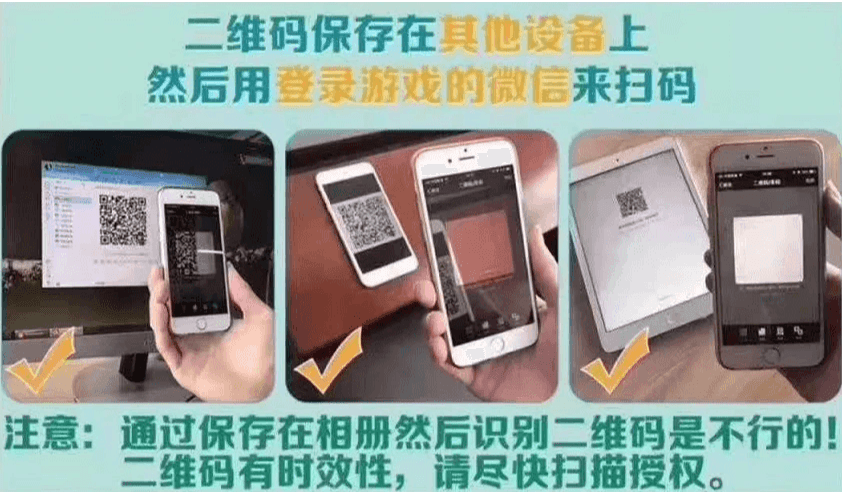
A unique QR code will be sent; scan using WeChat or QQ to complete recharge
Ensure your game account has passed real-name verification
The QQ or WeChat must match the one used for login
Double-check all info before submitting
BlazinGM is not responsible for user errors
No refunds once the product is delivered
1. Select the Coupon Denomination:
Choose the amount of coupons you want to purchase.
2. Enter Your Game Character Name and Login Method:
Provide the necessary details of your game character and how you log in (e.g., WeChat, QQ).
3. Check Out and Select Your Payment Method:
Proceed to checkout and choose your preferred payment option.
4. Contact Customer Service for a Recharge QR Code:
Reach out to customer support to get the QR code for the recharge.
5. Scan the QR Code with WeChat or QQ:
Use the WeChat or QQ account you use to log into the game to scan the QR code provided by customer service and authorize the transaction.
6. Complete the Recharge:
Once authorized, the recharge will be completed, and the coupons will be added to your account.